
Disable Video Progress Bar
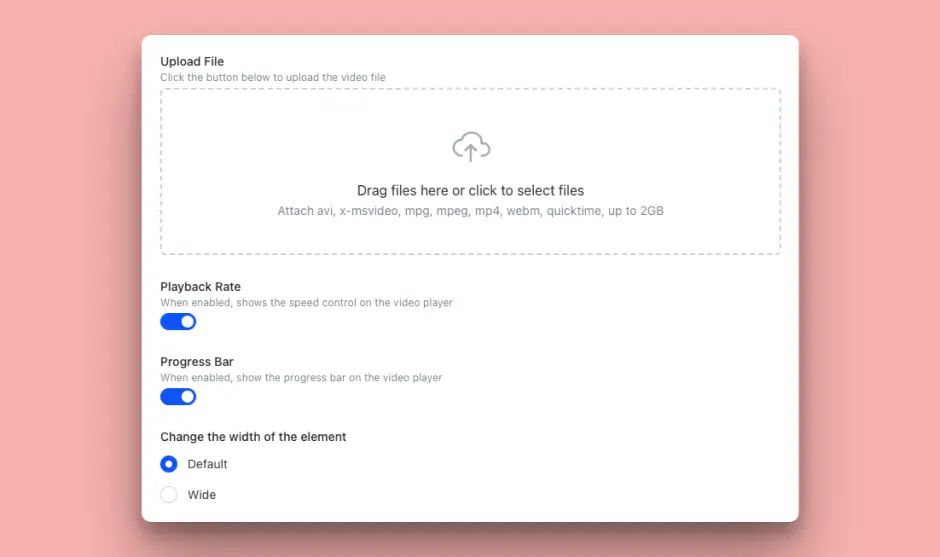
Teachfloor is proud to unveil a critical update to our platform, aimed at enhancing the integrity and effectiveness of mandatory courses: the "Disable Video Progress Bar" functionality. This new feature is designed to ensure that students fully engage with video content, a key component for courses that culminate in certification.
Understanding the importance of comprehensive engagement in learning, especially in courses that are prerequisites for certification, we have introduced the option for instructors to disable the video progress bar. This feature is instrumental in maintaining the course's integrity, ensuring that students cannot skip through video content.
Key Features and Benefits
- Mandatory Viewing: By disabling the video progress bar, instructors can set videos to be watched in their entirety, preventing students from jumping from one section to another.
- Completion Verification: Instructors can activate an option requiring students to complete the video before they can proceed, further ensuring that the educational content is fully consumed.
- Enhanced Learning Assurance: This feature is particularly valuable for mandatory courses where certification depends on the student having comprehensively completed all activities, including video-based learning.
How It Works
Instructors now have the option to disable the video progress bar when setting up a video activity within a course. This can be done through the course editing interface, where you can also enable the requirement for a video to be watched in full before the activity is marked as complete. This approach guarantees that students engage with the content in a linear fashion, enhancing learning outcomes and ensuring compliance with course requirements.
Conclusion
This feature reinforces our commitment to supporting educators in delivering mandatory courses and ensures that students receive the full value of their educational experience.
We are excited to see how this new functionality will be utilized to enhance learning outcomes and maintain the quality of certification courses.
As always, we welcome your feedback and look forward to continuing to support your educational goals with innovative features and updates.


